A smart home is ready for handover when it works in the finished house, the homeowner controls the accounts, the family knows the everyday commands, the installed system is documented, and support responsibilities are clear. For a Houston custom home, that review should happen after permanent power, internet service, finishes, and connected equipment are in place, but before final signoff and move-in.
Handover is not a five-minute app demonstration. It is the point when a collection of installed products becomes a home the owner can operate with confidence.
ETG treats that transition as a final system review. We test what the family will actually do, confirm that late construction changes have not created new conflicts, and leave a clear record for future service.
Set the House Up for a Real Test
The handover walkthrough needs the same conditions the owner will have after moving in. Temporary internet, unfinished electrical work, missing source devices, and open punch-list items can hide problems or create false ones.
Before the review, ETG confirms which systems are ready and which still depend on another trade. The working conditions should include:
- Permanent power to the technology rack and connected equipment
- Active internet or fiber service at its intended entry point
- Installed network switches, access points, controllers, and user interfaces
- Final televisions, audio sources, remotes, and charging locations
- Finished doors, locks, gates, shades, and window treatments that interact with technology
- Final lighting loads, keypads, and scene programming
- Current security, HVAC, pool, or other trade interfaces that are part of the control plan
If something is not ready, it belongs on the handover list with an owner and a next test. Calling an incomplete dependency “done” only pushes the same problem into move-in week.
Verify the Finished House Room by Room
Testing from the equipment rack proves that equipment is online. It does not prove that the home is easy to use.
ETG walks the finished spaces with the current plans and programming list. In each room, we check the controls that belong there and the result the owner expects. That may include:
- Keypad labels and button actions
- Lighting scenes at the correct fixtures and dimming levels
- Shade travel, stopping points, and clearance from furniture or trim
- Television sources, audio, volume control, and room-off commands
- Thermostat or climate commands that are intended to appear in the control system
- Camera views, doorbell calls, gate release, and access notifications
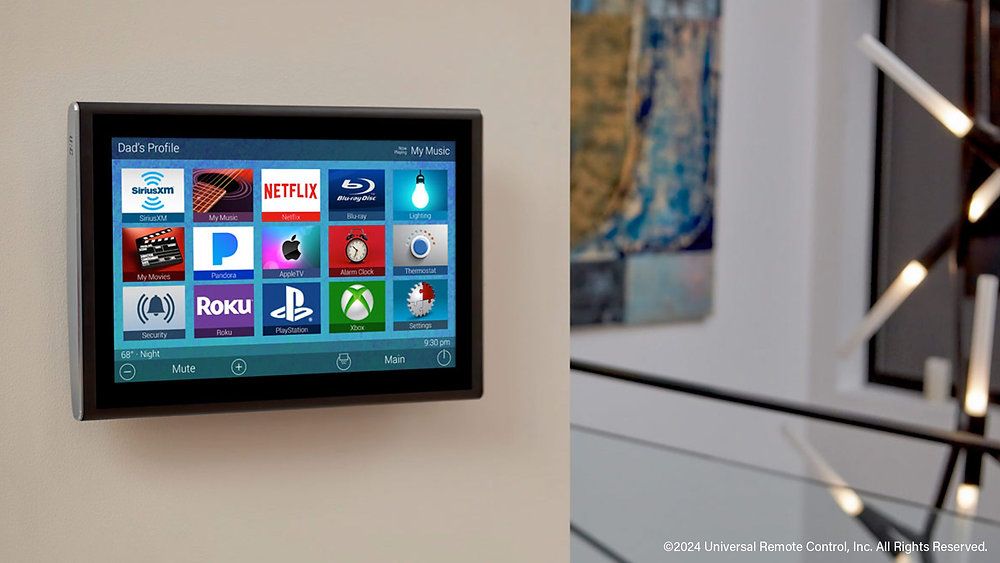
- Touchscreens, remotes, and apps showing the correct room names
- Whole-home commands such as Goodnight, Away, or All Off
We also look for small mistakes that make a polished system feel unfinished. A room may be labeled with an old plan name. A scene may control the wrong decorative fixture. A volume limit may be sensible in a bedroom but frustrating on a patio. A doorbell notification may reach one phone and not another.
The finished-room walk catches those issues where the owner experiences them.
Test the Network Where Connected Devices Actually Operate
The network is part of almost every modern control system, even when the homeowner rarely sees it. A clean handover checks the network from the rooms, work areas, exterior spaces, and device locations that depend on it.
ETG's Networking Solutions work treats wired connections, wireless coverage, internet service, and remote access as different parts of one plan. During handover, the checks should follow actual use:
- Join the owner devices that will control the home
- Walk between the main living spaces while using a phone or tablet
- Test the home office, bedrooms, media rooms, patios, garage, gate, and other required areas
- Confirm that fixed equipment expected to use a wired connection is on that connection
- Check camera, doorbell, television, music, and control interfaces from their normal locations
- Verify what remains available on the local network when internet service is unavailable
- Confirm that remote access works only for the approved users and support roles
One headline speed number cannot answer whether the system is ready. Use the applications in their actual locations: hold a video call from the office, view a camera through the control app, play music on the patio, and stream television in the main rooms. Each failure points to a different part of the design.
The homeowner should also understand the line between an internet-provider outage and a local network issue. ETG's guide to what works when the internet goes down explains why those failures are not the same.
Put the Homeowner in Control of Accounts
No finished smart home should depend on a builder's temporary email address, an installer-only recovery phone, or an account the owner cannot reset.
At handover, review every account that affects control, remote access, alerts, subscriptions, or software. The exact list varies by system, but the ownership questions stay consistent:
- Primary owner: The homeowner's chosen email address, not a temporary project account
- Recovery: The person and device that receive reset and security alerts
- Authentication: Multifactor protection wherever the platform offers it
- Roles: Administrator access for the right people and simpler everyday control for everyone else
- Remote support: An agreed scope for any access the integrator retains
- Billing: Clear ownership of recurring subscriptions or cloud services
- Cleanup: Removal of old construction, demonstration, or vendor accounts
Passwords, alarm codes, network keys, and recovery codes should go into the owner's chosen secure password manager or protected record. They should not be pasted into an open project binder or emailed around the construction team.
ETG can help identify the accounts that need to change hands. The owner should leave the meeting able to sign in, approve access, recover the account, and remove access later if needed.
Collect the As-Built Record
The design set shows what the team intended to build. The as-built record shows what is actually in the house.
Useful handover documentation may include:
- A final floor plan with key device and control locations
- Current room names and programmed scenes
- Rack or enclosure elevations with legible equipment and cable labels
- Network equipment, access-point, and wired-device mapping
- Display, speaker, shade, camera, keypad, and controller model information where useful
- Warranty, registration, and purchase records that the owner may need
- Notes for concealed conduit, spare pathways, blocking, or service openings
- The date and responsible party for the current programming or configuration backup
- Required apps, subscription owners, and manufacturer support references
- ETG and trade contact information for the systems each party supports
This record should reflect field changes. If an access point moved because of a ceiling beam, a television source moved into millwork, or the gate route changed during landscaping, the final document should not keep showing the abandoned location.
Good documentation is not a pile of manuals. It is enough accurate information for the owner and a qualified service technician to understand what exists without reopening walls or reverse-engineering the project.
Teach the Household the Daily Paths
Most owners do not need a lesson on every installer setting. They need a reliable path through the situations that happen every day.
A useful training session follows real routines:
- Turn on a television and choose a source
- Play music in one room, then group or stop rooms
- Use the main lighting scenes and make a temporary adjustment
- Open or stop a shade from its normal control
- Answer the doorbell, view a camera, or release the gate
- Use Goodnight, Away, and All Off commands
- Give a guest, housekeeper, or family member the right level of access
- Find a charging location and replace or recharge common controller batteries
- Identify what to check before requesting service
The family should know the simplest control path for each task. If the television can be operated from a handheld remote, wall touchscreen, phone app, and voice command, that does not mean every person needs to learn all four on day one.
For a larger integrated home, ETG's Smart Home Automation planning keeps those controls consistent across lighting, shades, entertainment, climate, security, and access.
Reconcile Late Construction and Furniture Changes
The final house rarely matches the early drawings in every detail. Cabinet depths or pocket doors may change, decorative fixtures can grow, and furniture sometimes lands in front of a keypad. A new ceiling treatment may also cover a planned device location.
The handover walk is the last broad review of how those changes affect daily use. ETG looks for conditions such as:
- A control blocked by an open door, cabinet panel, or furniture layout
- A wireless access point hidden by new millwork or moved away from its planned coverage area
- A camera view narrowed by landscaping, columns, or a new light fixture
- A shade hembar or fabric path meeting furniture, trim, or a door handle
- A speaker, sprinkler, light, detector, and access point competing visually on the same ceiling
- A television or soundbar connection that is no longer serviceable after finish work
- Storage added around the rack or enclosure that limits airflow or service access
Some corrections are programming changes. Others need a builder, electrician, security contractor, shade installer, HVAC contractor, or cabinetmaker. The important step is to assign the issue before the project team disperses.
Define Support Before Move-In
Every technology system will eventually need an update, a replacement battery, a new streaming login, or help after another device changes. The handover should explain what happens next.
The owner should leave with clear answers:
- Coverage: The boundaries between the installation warranty, manufacturer warranties, and any service plan
- First contact: The right provider for a control, network, AV, lighting, shade, or access problem
- Remote support: Whether it is enabled, who may use it, and what a technician can see or change
- Updates: Who decides when controller, device, or app updates are installed
- Owner changes: The settings an owner can adjust without affecting programmed functions
- Trouble reports: The details and photos that will help a technician understand a problem
A useful basic recovery card can be short: identify the room and failing function, note any error message, check whether power or internet service is also affected, and contact the responsible support provider before unplugging rack equipment at random.
ETG offers Maintenance Plans for homeowners who want an ongoing service relationship. The exact coverage should be reviewed against the installed system instead of assumed at handover.
What ETG Reviews at Final Handover
ETG's final technology review brings the pieces into one accountable list:
- Installed reality: Compare the finished rooms with the current plans, labels, and programming. Then run the owner's main routines from the controls the family will use.
- Connections and access: Verify required wired, wireless, local, and remote connections. Confirm owner accounts, recovery methods, user roles, and approved support access.
- Records and training: Deliver the current as-built record, identify missing trade documents, and teach daily operation and basic recovery.
- Open work: Record every unresolved item, who owns the correction, and how the function will be retested.
This is a technology readiness review, not approval of the builder's entire closeout. ETG reviews and recommends the steps needed for the integrated systems to be usable, supportable, and ready for the owner.
When to Schedule the Handover Review
Set the handover date before the final construction calendar fills up. The best window is after permanent power, internet service, finish work, and connected equipment are ready, but before final builder signoff, movers, and everyday household use make corrections harder to coordinate.
Send ETG the current plans, equipment list, control and scene goals, owner contact information for account setup, known construction changes, outstanding trade items, and target move-in date. Contact ETG to schedule the technology handover review before the project team leaves the job.
FAQs
When should a smart home handover happen?
Schedule it after permanent power, internet service, finishes, and connected equipment are ready. Complete the review before final signoff and move-in so the project team can still resolve field or trade issues.
Who should attend the handover walkthrough?
The homeowner and technology integrator should attend. The builder, electrician, security provider, HVAC contractor, shade installer, or another trade should join when an open function depends on that trade's work.
Should the integrator keep remote access after handover?
Only with the homeowner's knowledge and agreement. The owner should understand what remote support can access, who is authorized to use it, and how that access can be changed or removed.
What documents should the homeowner receive?
Receive the current device and room record, useful as-built plans, rack and cable labels, account and subscription ownership notes, warranty records, app list, support contacts, and the status of configuration backups. Keep passwords and recovery codes in a separate secure record.
What if internet service is not active yet?
Test the local functions that are ready, but do not call the full handover complete. Cloud services, remote access, streaming, updates, and real-world network behavior still need a final test after permanent service is active.